
Tool // Version 1.4.1 // free
TT-REAPERMANAGER
The free REAPER manager. It sets up REAPER for you and keeps it current. Everything is installed from the official sources, nothing is bundled. One click updates REAPER, the extensions, your scripts and the manager itself, and one click backs up or restores a whole installation. You see the plan first.
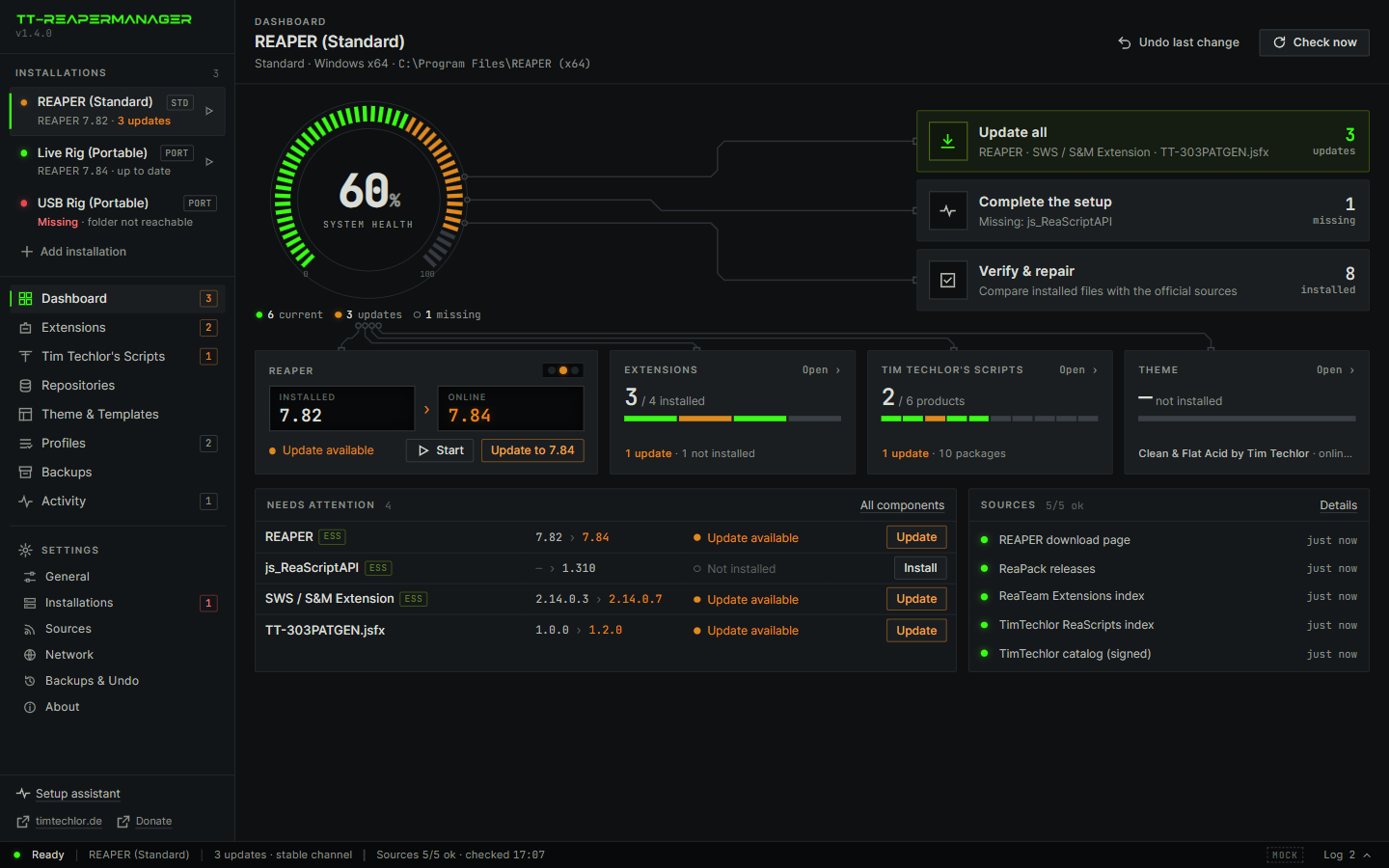
- Nothing bundledNo copy of REAPER, no mirror, no hidden extras. Every file comes from its official source, and the plan names each download host.
- 1-click updateThe manager updates itself, REAPER, the extensions and your scripts. One plan, one confirm.
- Ready to playThe setup does the fine work, so you open REAPER after the install and start making music.
What a REAPER manager is
TT-REAPERMANAGER does not contain REAPER, ReaPack or any plug-in. It is the tool that fetches them from where they belong, installs them in the right place and keeps them current. Think of it as a package manager for REAPER.
Nothing is bundled
REAPER comes from reaper.fm, ReaPack and the extensions from their public repositories, scripts and effects from their own ReaPack repositories. Tim Techlor's packages come from the Tim Techlor ReaPack index. Files are checked against the published checksum where the source offers one.
1-click update
The manager updates itself: it checks for a new version, shows it and installs it with one click, or automatically if you prefer. Updates are signed and verified. REAPER, extensions and scripts follow with Update all.
For professionals
Several portable rigs, pinned versions, profiles, every ReaPack repository in one searchable list, a plan before every change and an Undo after it. You keep control and lose the busywork.
For beginners
You do not need to know which extension a script wants or which folder it belongs in. The setup assistant does that work: REAPER, ReaPack, the recommended extensions, the theme and the toolbar.
Start right away
When the assistant is done, REAPER is installed, the scripts are registered as actions and the window is laid out. Open REAPER and play.
You stay in charge
You see the plan first, with every file and every download host. Nothing existing is overwritten without a backup, and Undo puts the last run back. Whole installations can be backed up and restored with one click.
Install and update REAPER, ReaPack and scripts
REAPER
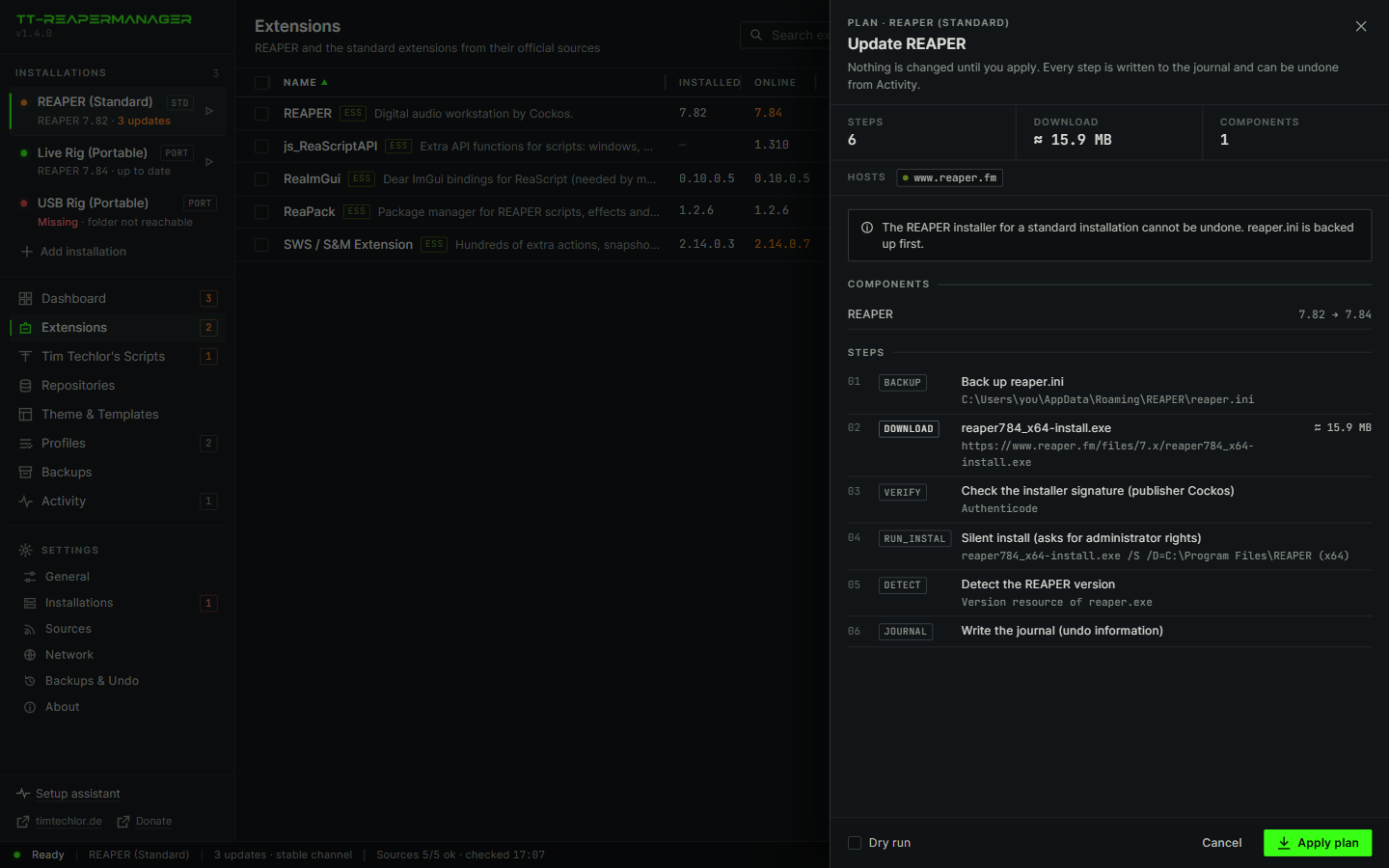
Install or update, standard or portable. The plan says when a step cannot be undone.
Extensions
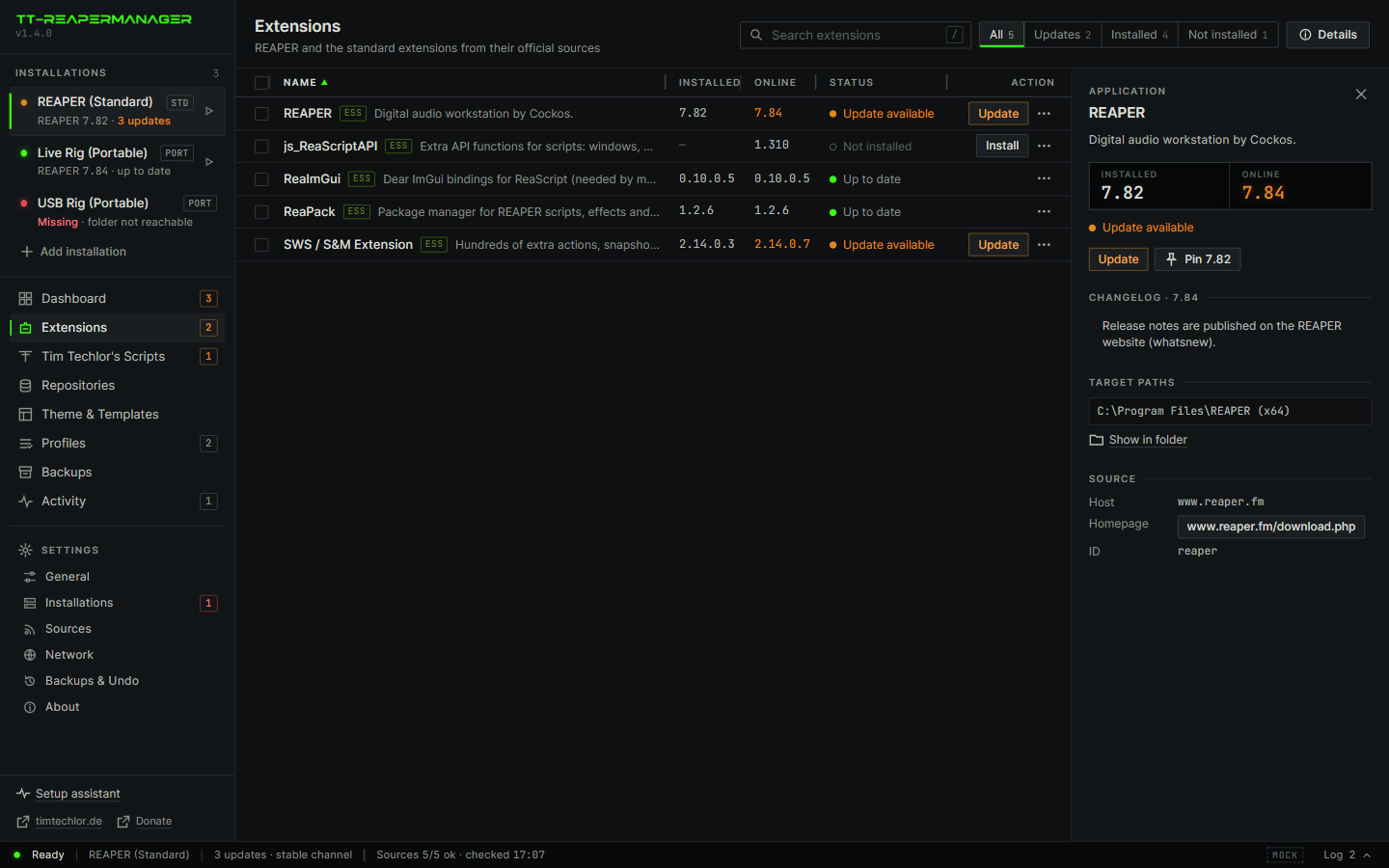
SWS, ReaPack, ReaImGui, js_ReaScriptAPI. Installed against online. Update, or Update all.
Tim Techlor's Scripts
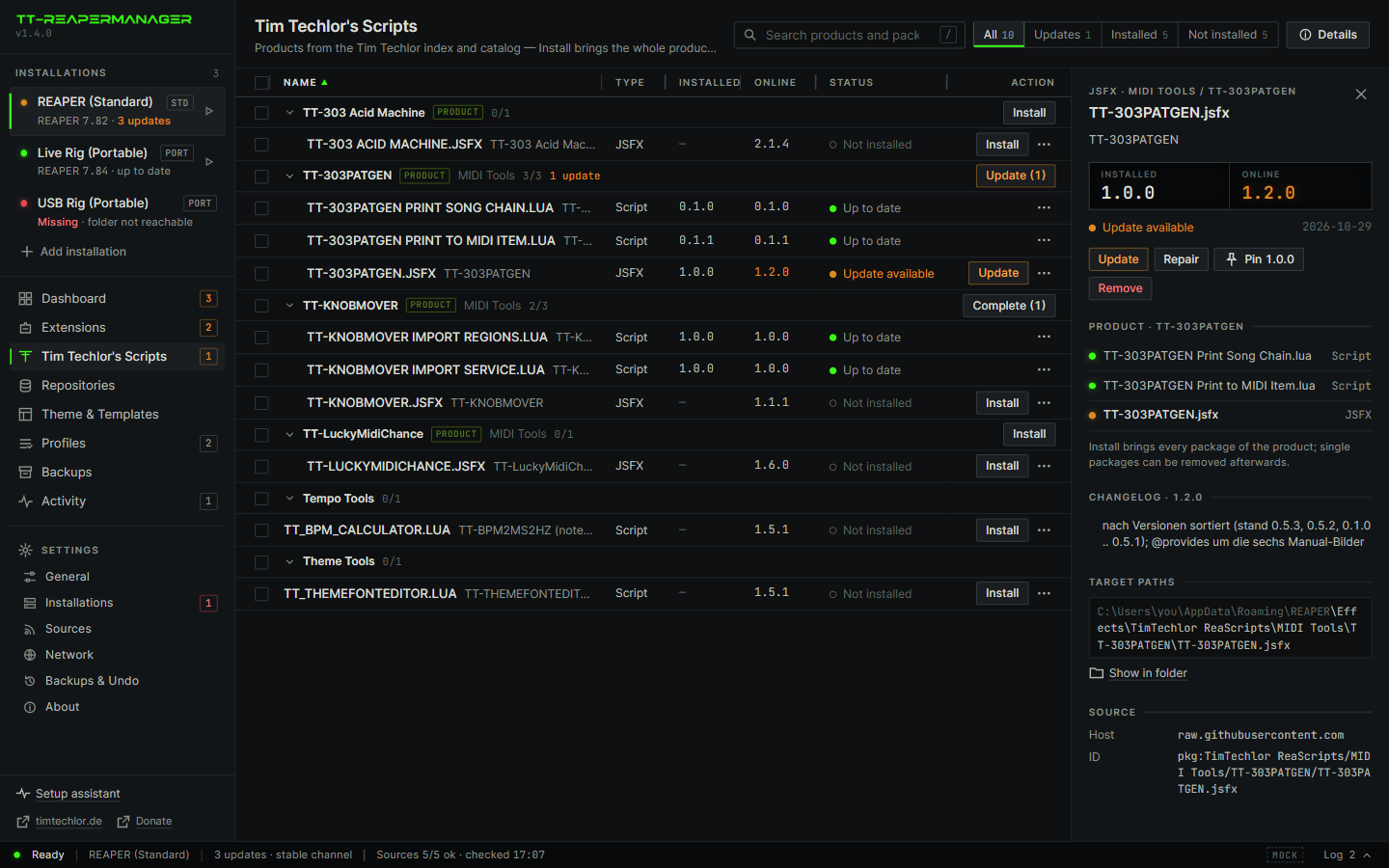
Scripts and effects from the ReaPack index. A missing dependency is added to the plan.
All your scripts
Keeps scripts and effects from every ReaPack repository you use up to date, not only ours. Update all covers them too.
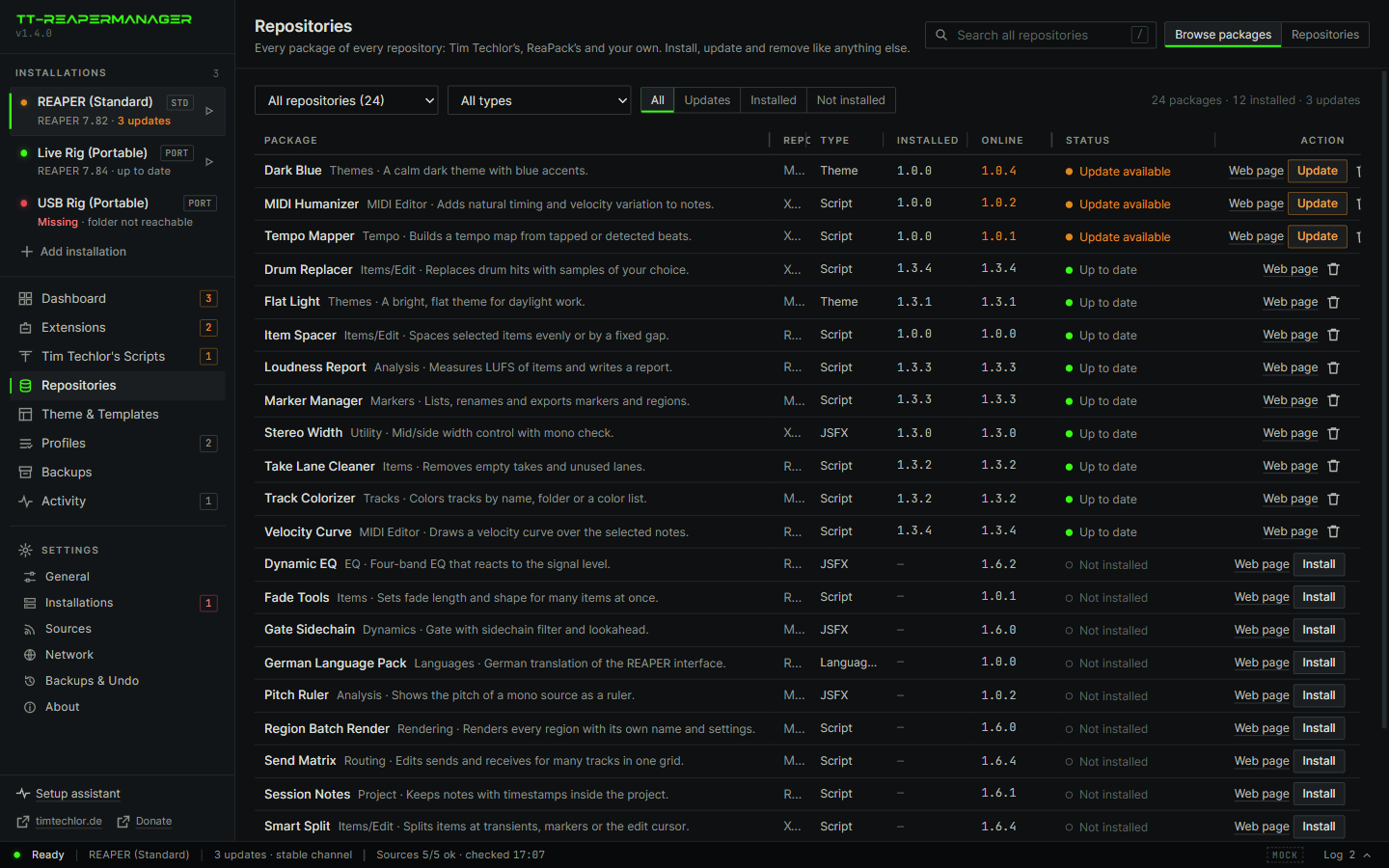
Repositories
Reads the list from ReaPack, lets you add more, and searches all packages in one place. Install, update and remove like anything else.
Theme and workspace
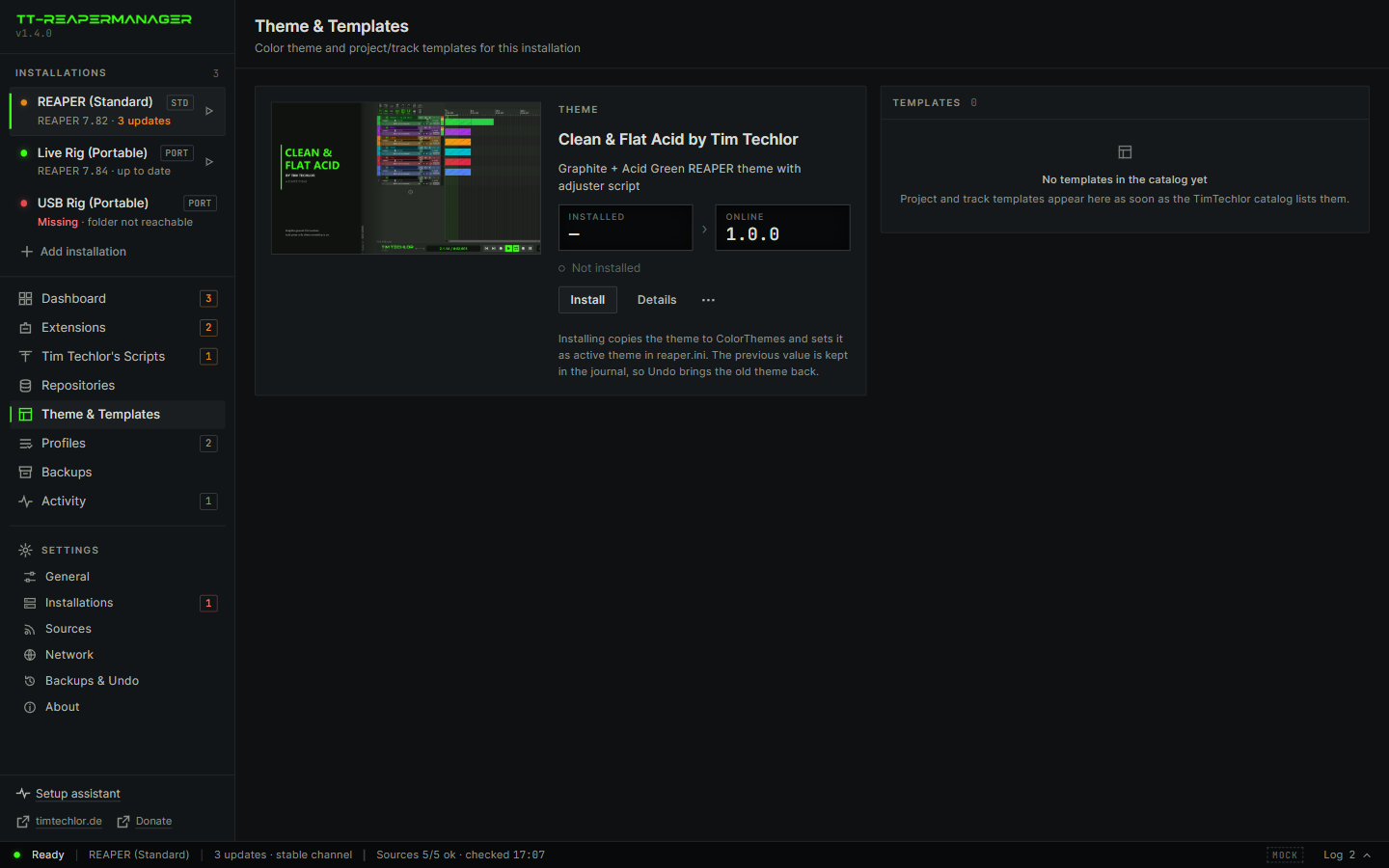
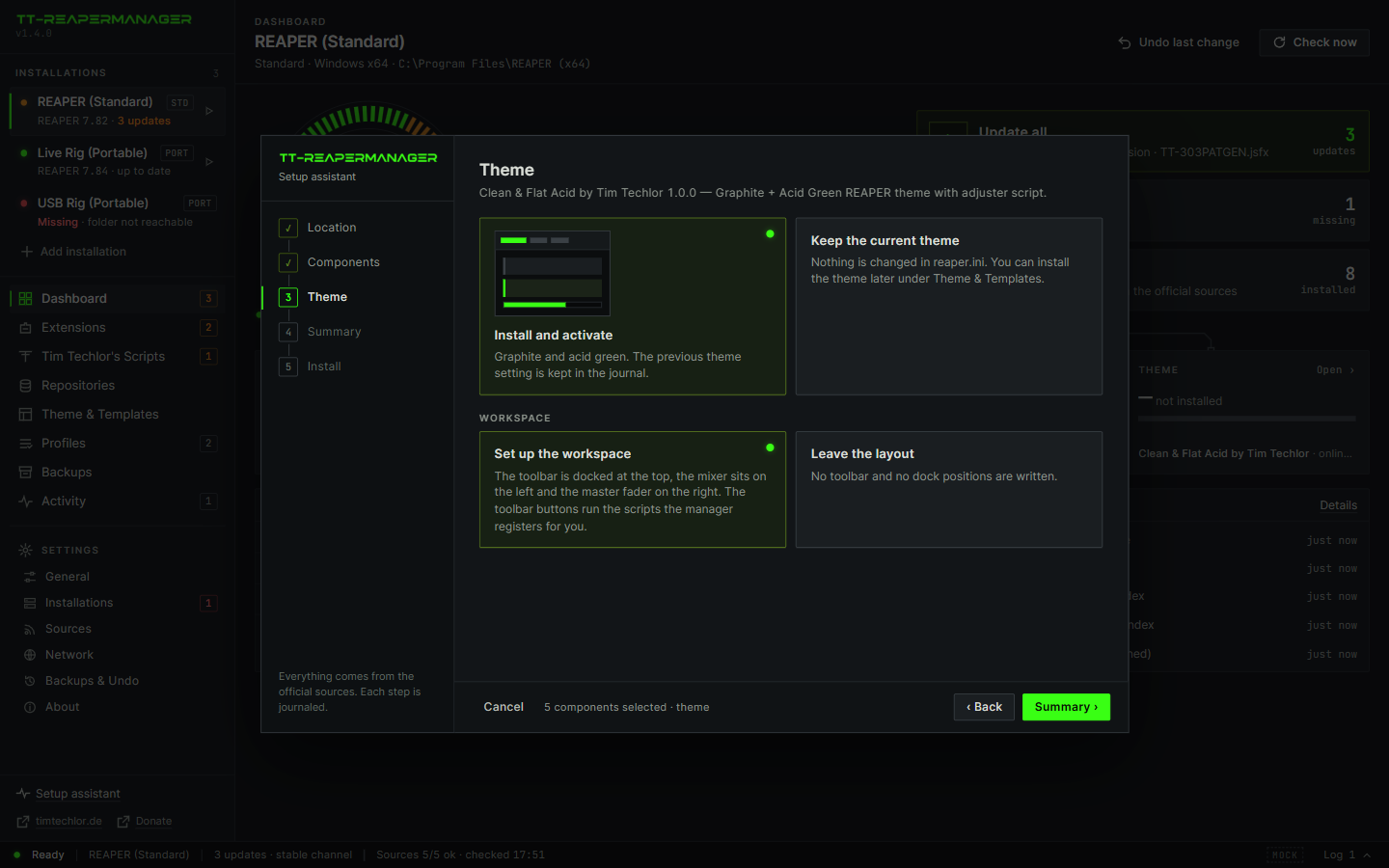
Clean & Flat Acid becomes the active theme. On a new installation the toolbar is docked at the top, its scripts are registered and the mixer is laid out. Undo puts the old state back.
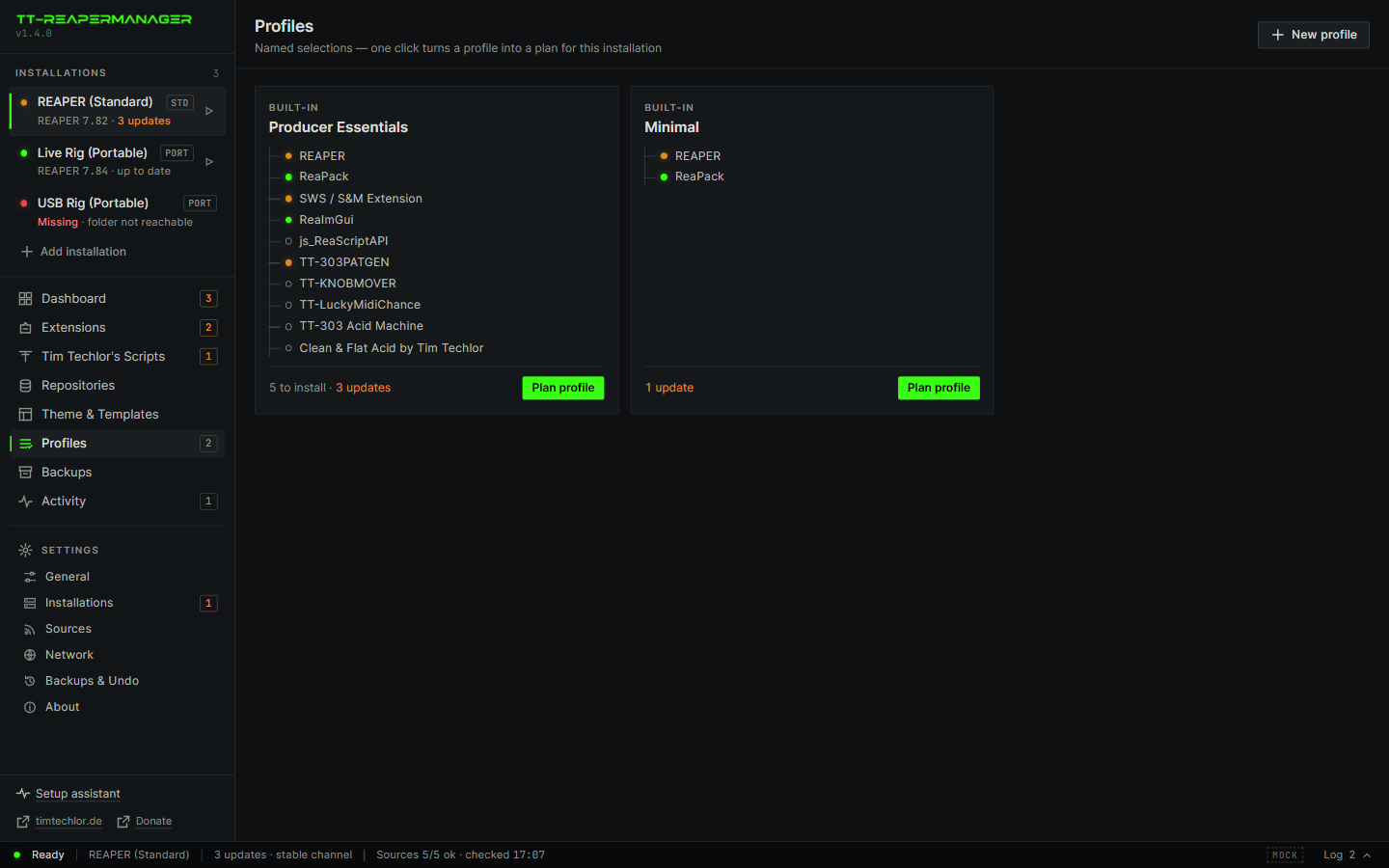
Profiles
A named set: REAPER, the extensions, the theme. One click builds the plan for the whole set.
Your backup folder
Optional: choose a folder on a backup drive or in a synced folder, and switch back to the default with one click.
Repair
Checks the files against the recorded checksum and fetches what does not match. The journal can undo the last run.
Backups, 1 click
Saves a whole REAPER installation as a dated ZIP: settings, key maps, scripts, effects, themes and extensions. Every backup shows its date and size.
Restore, 1 click
Puts a backup back after one confirm. The current state is saved first, so even a restore can be reversed from the same list.
Updates itself, 1 click
Checks for a new version and installs it with one click: through the setup if installed, by replacing the file if portable. Signed and verified. Off, notify or automatic.
REAPER keeps the program in one folder and the themes, scripts and extensions in another. Updates arrive from reaper.fm, GitHub and ReaPack repositories. The manager reads those sources, including the repositories you already use in ReaPack, and does the copy. It brings nothing of its own along.
It does not replace REAPER. It does not mix a session, and it does not edit a theme by hand. The theme adjuster stays inside REAPER.
Why it makes life easier
REAPER is small and fast, but keeping it current is not: the program, the extensions, the scripts, the themes and the repositories all update in different places. The manager puts that into one list and does the work.
Fewer clicks
REAPER 7.84 is out? No browser, no download folder, no installer wizard. Click Update, read the plan, confirm. Update all does the same for every outdated extension and script at once.
One overview
A health ring, a version column for everything, and a badge on each page that counts the updates. You see in seconds what is current and what is not.
Nothing surprising
You see the plan first: every file, every download host. Files are backed up before they are overwritten, and Undo in Activity puts the last run back.
Your version stays
Pin REAPER or any script to a version and Update all skips it. Useful before a gig, or when a newer build changes something you rely on.
Repair in one click
A file got deleted or overwritten? Repair checks every file against the recorded checksum and fetches only what differs.
Search everything
Type a word and find the package in any repository, yours from ReaPack included. Install it from the same list, with the same plan and the same Undo.
Ready to play after the install
Install the theme in the setup assistant and the window is set up as well, in new standard and portable installations alike. Open REAPER and everything is where it should be.
- Toolbar docked at the topThe Tim Techlor toolbar sits above the arrange view: Media Explorer, Mixer, Render, MIDI tools, grid values, zoom, markers and the panic buttons, with the matching icons from the theme.
- Scripts registeredEvery button that starts a script points to a script that is installed and registered as an action in this REAPER. Nothing to load by hand, no “action not found”.
- Mixer left, master rightThe mixer is docked on the left and the master fader sits on the right-hand side.
- Optional extrasChordGun, MK Slicer, Color palette and Quick Adder have a button too. Tick them in the assistant and they are installed from their official ReaPack repositories. Leave them out and the button is left out as well.
- Your own layout is safeIf a REAPER already has a toolbar or dock layout, the manager leaves it as it is and says so in the plan. Undo restores the previous state.
Back up and restore REAPER with one click
Before a big update, before a new plug-in, before the gig: save the whole REAPER installation with one click, and bring it back with one more if something goes wrong. Every backup shows its date and its size.
- One click to back upClick “Back up now” and the manager saves the installation as one ZIP file: settings, key maps, menus, scripts, effects, themes, extensions and templates. A portable REAPER is saved with its program folder. You watch the files and megabytes count up and can cancel at any time.
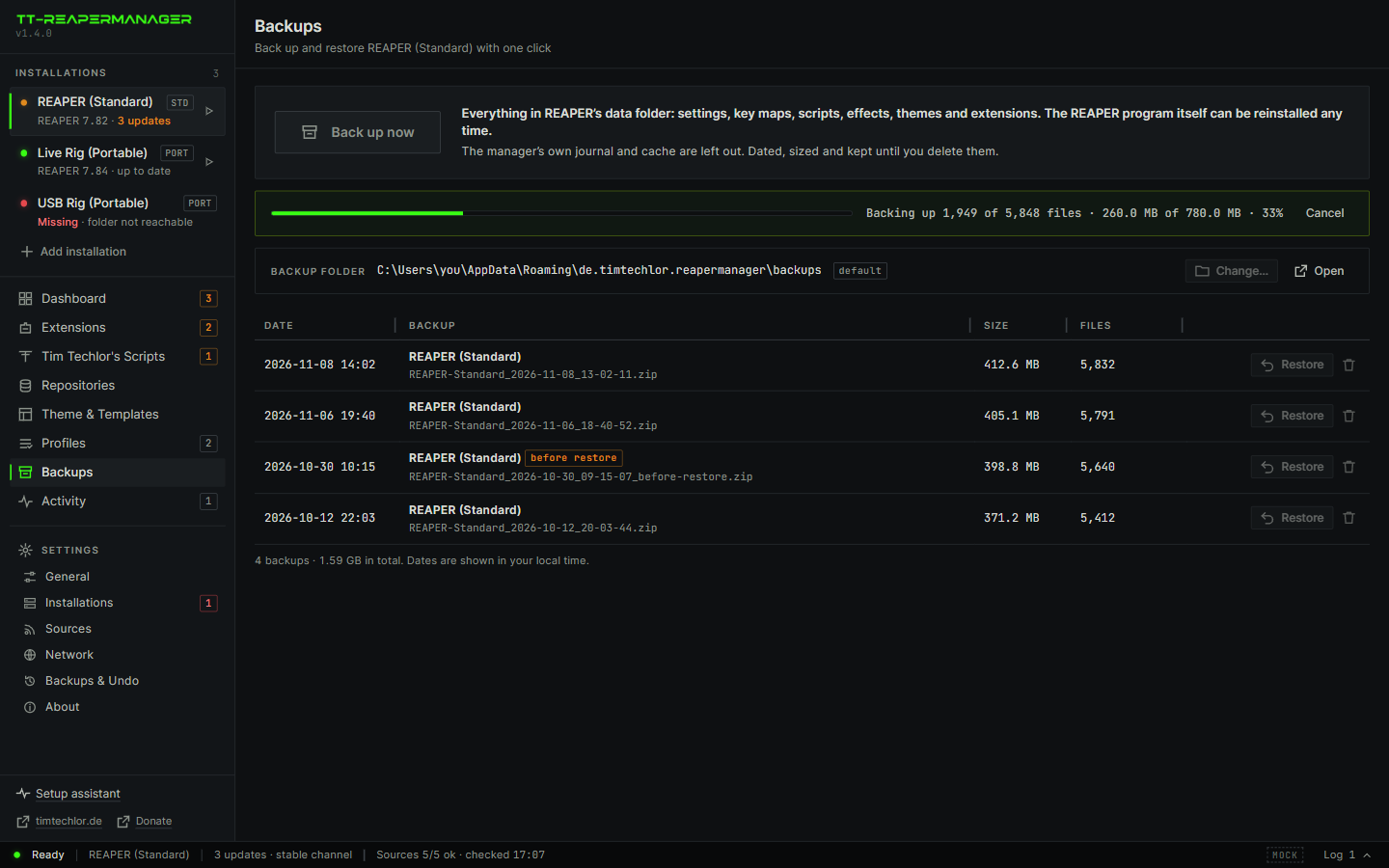
- Date and size on every backupThe list shows when each backup was made (in your local time), how big it is and how many files it holds. Backups made automatically before a restore carry a “before restore” label.
- Your own backup folder, if you likeBy default backups go to the manager's data folder. Choose any other folder, for example on a backup drive or in a synced folder, and switch back to the default with one click. Backups are plain ZIP files you can copy and keep.
- One list per installationEach installation keeps its own backups. The live rig and the studio rig never mix them up, and a backup is only restored into the installation it came from.
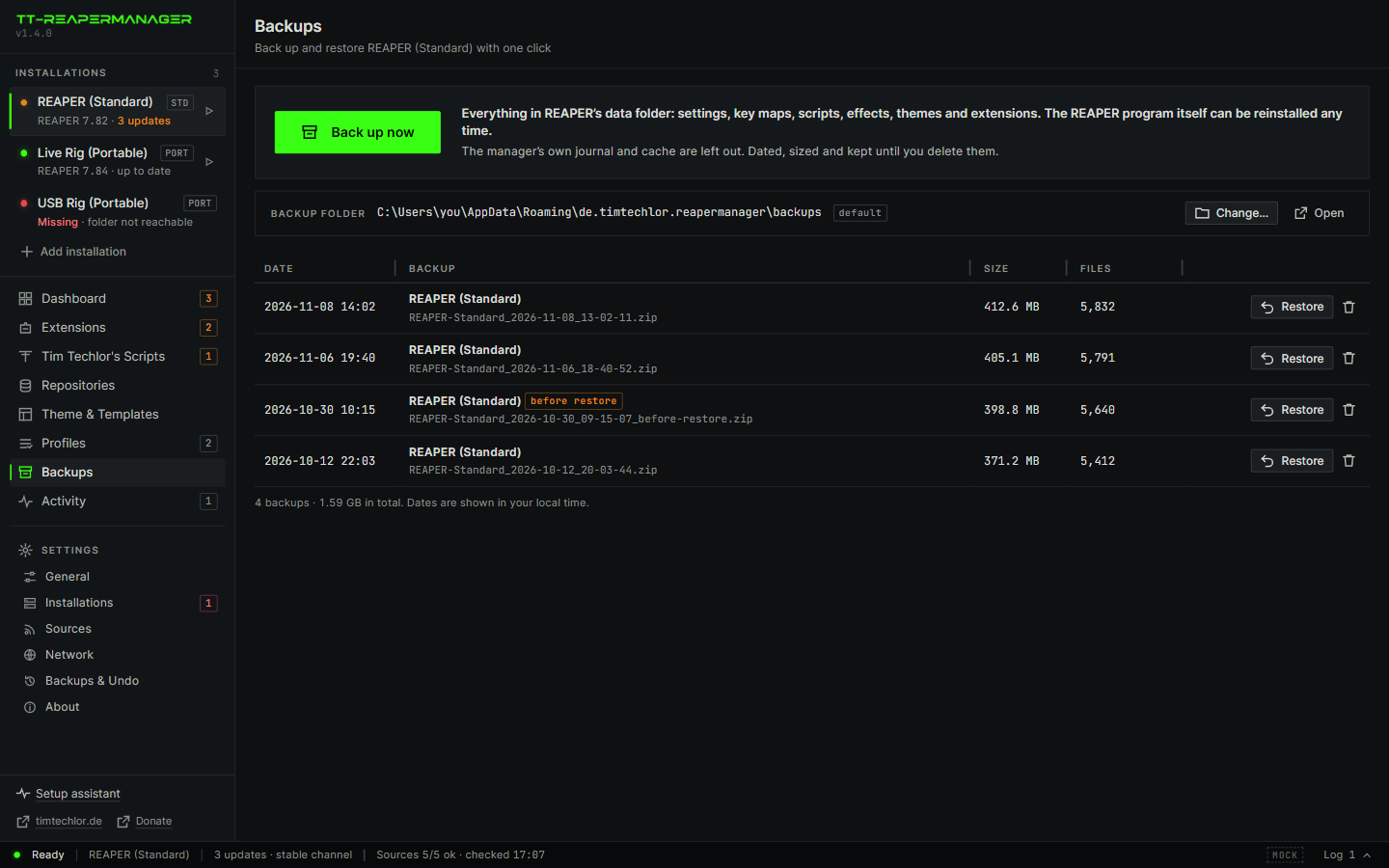
- One click to restoreClick “Restore” on a backup and confirm. REAPER has to be closed. The files from the backup are written back. Files that are not in the backup stay where they are.
- A safety net under every restoreBefore a restore writes anything, the manager saves the current state as a new backup. A restore you regret is one more click away.
- Checked before it is trustedA restore writes scripts and plug-ins that REAPER will run, so the manager only restores what it can vouch for. A backup it made itself is checked against its recorded checksum, and a changed file is refused. A ZIP from somewhere else is marked “not verified” and needs your explicit OK.
Several portable REAPER installs, one window
Many people keep more than one REAPER: a live rig, a studio rig, one on a USB stick, a clean one for testing. Done by hand, every copy needs its own updates, its own extensions and its own bookkeeping. The manager turns them into a list.
-
AEvery rig in one list
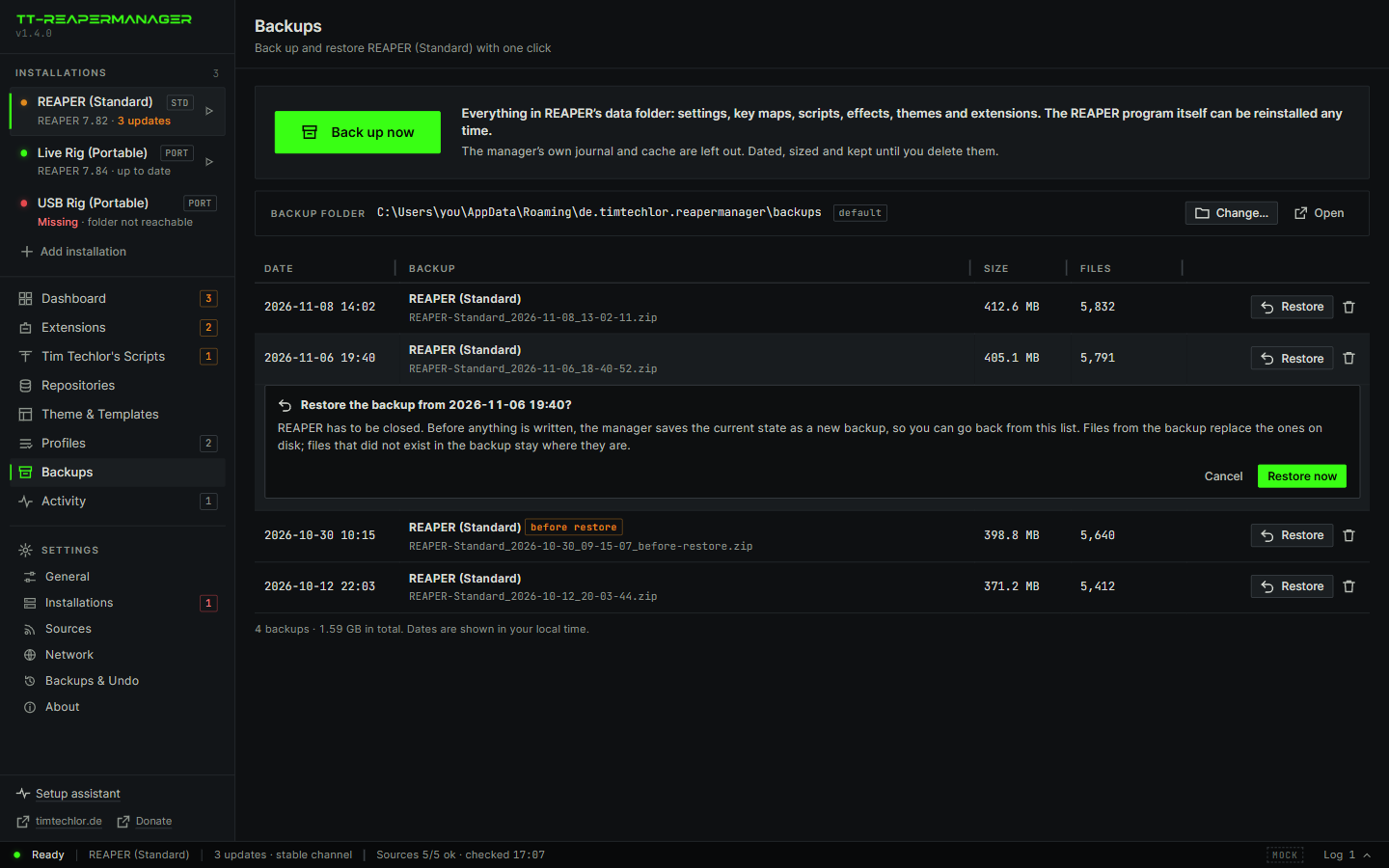
- Every rig at a glanceThe side bar lists each installation with its REAPER version and its update count. You see which rig is behind without opening any of them.
- Rigs on removable drivesA USB stick that is not plugged in shows as missing and is not forgotten. Plug it in and it is back in the list.
- Start from the listEach installation has a start button. Open the right rig from the same place where you keep it current.
-
BThe same setup everywhere
- The same setup on every rigA profile is a named set: REAPER, extensions, theme and scripts. Plan the same profile for each rig and they end up alike. Producer Essentials and Minimal come built in; make your own.
- A new rig in one goThe setup assistant creates a portable REAPER in the folder you choose, with the extensions and the theme you tick. Or add a folder that already exists.
-
COne rig at a time
- Update in your orderUpdate the studio rig first and try it, then the live rig. Or pin REAPER on the live rig so nothing changes before the gig.
- Independent copiesA plan targets exactly one installation. What you do to one rig never touches another, and each rig keeps its own backups and its own Undo.
Free download
Pick your system. Each box has two ways to get the same program: an installer, which puts it on the computer like any other app, and a portable file, which you just start and which leaves the system as it was.
Good to know: the builds are not code-signed yet, so Windows SmartScreen or macOS Gatekeeper may ask once before the first start. The macOS builds are for Apple silicon (M1 and newer). The downloads are only offered here on timtechlor.de.
Version 1.4.1. 11 files.
Windows
Windows 10 and 11, 64-bit
InstallerTT-Reapermanager_1.4.1_x64-setup.exe5.3 MBInstalls for your user account, adds a Start menu entry and an uninstaller. No admin rights needed. The best choice for most people.
Portablett-reapermanager-windows-x86_64.exe19.2 MBOne exe. Nothing is installed and nothing is added to the system. Run it from any folder or a USB stick. Needs the Edge WebView2 runtime, which current Windows already has.
Linux
64-bit (x86_64)
Installer (.deb)TT-Reapermanager_1.4.1_amd64.deb9.1 MBFor Debian, Ubuntu, Mint and relatives. Installs through the package manager, which also fetches the libraries it needs.
Portable (AppImage)TT-Reapermanager_1.4.1_amd64.AppImage88.1 MBRuns on most distributions without installing. Make it executable once, then start it. Larger, because it carries its own libraries.
macOS
Apple silicon (M1 and newer)
Installer (.dmg)TT-Reapermanager_1.4.1_aarch64.dmg7.1 MBOpen the disk image and drag the app into Applications.
Portablett-reapermanager-macos-aarch6420.5 MBA single executable without a disk image. Make it executable once (chmod +x), then start it from where it is.
All files and checksums
Two more files are in the list. The MSI is the Windows installer for admins who roll it out to many machines. The ttrm files are the command-line version without a window. The checksum is SHA-256.
| File | What it is | Size | SHA-256 |
|---|---|---|---|
| TT-Reapermanager_1.4.1_aarch64.dmg | macOS disk image | 7.1 MB | 651ad0edcea2650203831cbe5f9d8d9febfdc207e63c4eb00b507b3562eda791 |
| TT-Reapermanager_1.4.1_amd64.AppImage | Linux AppImage | 88.1 MB | 6cbe909e21f52ecaf72dc93fe9c88cea1020d7e1cdd459fd783440f00b6e3061 |
| TT-Reapermanager_1.4.1_amd64.deb | Linux package (.deb) | 9.1 MB | 70d487509962b0a6155728669e37be638aaa6ca2c524e62e442c061581afe449 |
| TT-Reapermanager_1.4.1_x64-setup.exe | Windows installer | 5.3 MB | 6c0ac13a1d964f75570785ecfcf9eb7a4f94512f5a92b6917ecf6d9b8e099b4e |
| TT-Reapermanager_1.4.1_x64_en-US.msi | Windows MSI | 7.3 MB | da11c5bae1a46de6eb0b3e56c50ab7ece97431d04f64744517a6d74688cf5adf |
| tt-reapermanager-linux-x86_64 | Linux app | 27.5 MB | aad0d1e64f6dfb7e8fc10a8ff2308318bfb0862b716296e679cf01f89097d8cd |
| tt-reapermanager-macos-aarch64 | macOS app | 20.5 MB | 8696835b2d41fe74b728eff464c9e7451548406debdf9973315638efbb20dc96 |
| tt-reapermanager-windows-x86_64.exe | Windows app, no installer | 19.2 MB | 1e57011877ba94e0b4cf77258ffa18609df075ae776580fb6e6577609106fba2 |
| ttrm-linux-x86_64 | Linux command line | 8.9 MB | 1fa08f552f667fba192a82358e270c229eb9f0bdd5eaafef00f341183c16eed5 |
| ttrm-macos-aarch64 | macOS command line | 7.0 MB | 0b44473cd0902ef513e5c3976637a355f8ffcecb7b92dda6bf4412f638b46863 |
| ttrm-windows-x86_64.exe | Windows command line | 6.4 MB | 0f7c2594568f4e994b3dea3bb8e21db55ad447d8e7ff5ba97a47ee183a7acf8a |
First start
- Open TT-REAPERMANAGER. It lists the REAPER installations it already found. Add a portable folder if you use one.
- Leave the recommended extensions on. Turn the theme on if you want Clean & Flat Acid, and keep “Set up the workspace” for the toolbar and the mixer layout. Tick the toolbar extras you want.
- Read the plan. It names every file and every download host. Then confirm.
- In REAPER, choose the theme under Options, Themes, if you did not let the manager activate it.
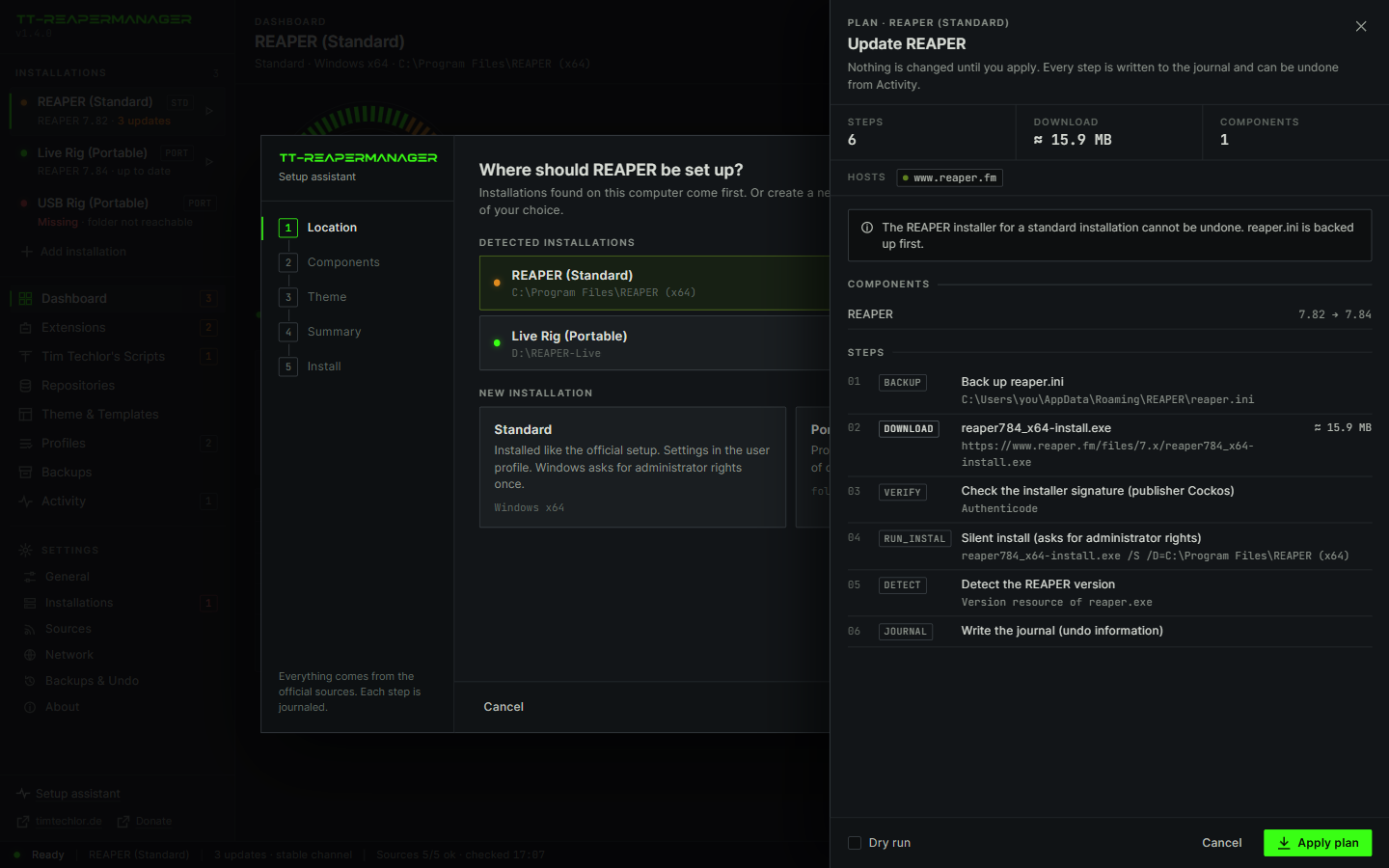
Nothing is bundled: REAPER comes from reaper.fm. ReaPack and the ReaTeam extensions come from their public repositories. Tim Techlor's packages, including the theme, come from the Tim Techlor ReaPack index.